
Introduction
Credit card payment processing fees are one of the most common costs freelancers and small businesses face when accepting online payments. Card payments are convenient for clients and customers, but every transaction usually comes with a fee.
If you accept payments through Stripe, PayPal, Square, Shopify Payments, Authorize.net, or another payment gateway, you may see a small percentage and fixed fee deducted from each sale. At first, this may not look like much. But over time, processing fees can reduce your profit.
For example, if you pay around 3% in card processing fees on $5,000 of monthly payments, that is about $150 per month. Over a year, that becomes $1,800. For freelancers, consultants, ecommerce sellers, agencies, and small online businesses, that money matters.
The challenge is that credit card processing fees are not always simple. A fee may include interchange fees, assessment fees, payment processor markup, gateway fees, international card fees, currency conversion costs, chargeback fees, refund policies, and payout costs.
This guide explains how credit card payment processing fees work, what freelancers and small businesses should watch for, how Stripe, PayPal, and Square fees compare, and how to reduce payment costs without making it harder for customers to pay.
What Are Credit Card Payment Processing Fees?
Credit card payment processing fees are the charges businesses pay when they accept credit card or debit card payments. These fees help cover the cost of moving money from the customer’s card account to the business.
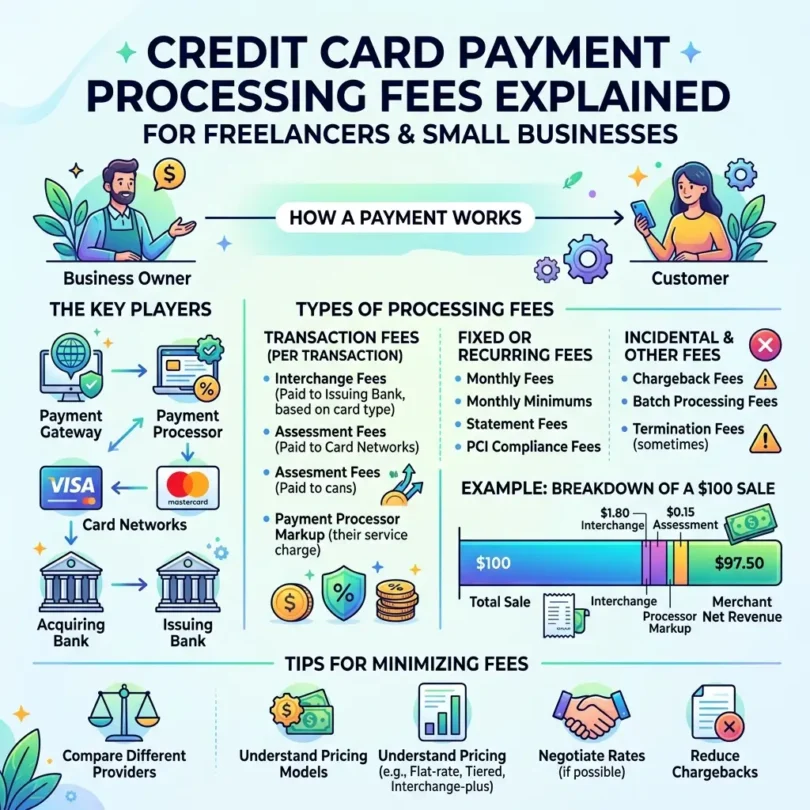
When a customer pays by card, several parties may be involved:
- Customer
- Customer’s issuing bank
- Card network such as Visa, Mastercard, American Express, or Discover
- Payment processor
- Payment gateway
- Merchant account provider or acquiring bank
- Business receiving the payment
Each party may play a role in authorizing, processing, securing, and settling the transaction.
That is why a card payment fee is not usually just one simple charge. It is often made up of different cost layers.
Why Credit Card Processing Fees Matter
Credit card processing fees matter because they directly affect your profit margin.
If you sell digital services, consulting, design, ecommerce products, subscriptions, or online courses, your payment processing costs can become a regular business expense.
For freelancers and small businesses, card fees can affect:
- Project profitability
- Product pricing
- Subscription margins
- Cash flow
- Invoice payment options
- International payment costs
- Refund losses
- Chargeback risk
- Tax records
- Accounting reports
A $3 fee may not matter on one transaction. But hundreds of card transactions can create a major monthly cost.
Example:
- Monthly card revenue: $10,000
- Average processing fee: 3%
- Monthly processing cost: $300
- Annual processing cost: $3,600
If your business has thin margins, processing fees can make a big difference.
How Credit Card Payment Processing Works
When a customer pays by card, the process usually happens in several steps.
Step 1: Customer Enters Card Details
The customer pays through:
- Website checkout
- Invoice payment link
- Payment gateway page
- Mobile card reader
- Point-of-sale terminal
- Virtual terminal
- Subscription checkout
- Digital wallet
Step 2: Payment Gateway Sends the Transaction
The payment gateway securely sends the transaction details to the payment processor.
The gateway helps protect sensitive payment information and allows the transaction to move through the payment system.
Step 3: Processor Contacts the Card Network
The processor sends the transaction through the card network, such as Visa, Mastercard, American Express, or Discover.
Step 4: Issuing Bank Approves or Declines
The customer’s card-issuing bank checks whether the customer has enough funds or credit available.
The bank may approve or decline the transaction.
Step 5: Payment Is Authorized
If approved, the payment is authorized. This means the transaction can move forward, but the money may not settle instantly.
Step 6: Funds Are Settled
After processing, the funds are settled into the business account or payment platform balance, minus fees.
Settlement timing depends on the processor, country, risk level, payment method, and account history.
Main Types of Credit Card Processing Fees
Credit card processing fees can include several components.
1. Interchange Fees
Interchange fees are fees paid between banks for card transactions. Stripe explains that when a customer pays by card, the business’s acquiring bank pays an interchange fee to the cardholder’s issuing bank. (Stripe)
Mastercard also explains that interchange fees are one component of the merchant discount rate paid by merchants to acquirers for card acceptance services. (Mastercard)
Interchange fees may vary based on:
- Card network
- Card type
- Debit or credit card
- Rewards card or standard card
- Business card or consumer card
- Transaction method
- Card-present or card-not-present
- Domestic or international card
- Merchant category
- Country or region
- Fraud risk
In general, premium rewards cards, international cards, business cards, and online card-not-present payments may cost more than basic domestic debit card transactions.
2. Assessment Fees
Assessment fees are charged by card networks. These fees are usually smaller than interchange fees but still form part of the total processing cost.
Card networks may charge assessment fees for access to their payment network and related services.
3. Processor Markup
The payment processor or merchant service provider adds its own markup. This is how the processor earns money for handling the transaction, technology, risk, support, reporting, and settlement.
Processor markup may be charged as:
- Flat percentage
- Fixed fee per transaction
- Monthly fee
- Gateway fee
- Statement fee
- Batch fee
- Custom pricing
- Subscription-style pricing
Examples of payment processors or gateway platforms include:
- Stripe
- PayPal
- Square
- Adyen
- Authorize.net
- Worldpay
- Shopify Payments
- Braintree
4. Payment Gateway Fees
A payment gateway fee may apply when payments are processed online.
Stripe’s guide explains that payment gateway fees are commonly structured as a fixed amount, a percentage of the sale amount, or both, and transaction fees often range from around 1.10% to 3.15% depending on the setup and provider. (Stripe)
Gateway fees may include:
- Per-transaction fee
- Monthly gateway fee
- Payment link fee
- Hosted checkout fee
- API processing fee
- Recurring billing fee
- Fraud protection fee
- Virtual terminal fee
Some platforms combine gateway and processing into one simple price. Others separate the gateway fee from the merchant processing fee.
5. Fixed Per-Transaction Fee
Many providers charge a small fixed amount per transaction.
For example:
- $0.10
- $0.15
- $0.30
- $0.49
Fixed fees matter more for small transactions.
Example:
- $0.30 fee on a $10 sale = 3%
- $0.30 fee on a $100 sale = 0.3%
That means small-ticket businesses should pay close attention to fixed transaction fees.
6. International Card Fees
International cards often cost more than domestic cards.
For example, Stripe’s pricing page lists an additional 1.5% for international cards in the context of card and wallet payments on the displayed pricing section. (Stripe)
International fees may apply when:
- Customer card is issued in another country
- Business is located in a different country
- Currency conversion is required
- Cross-border payment rules apply
- International card network charges apply
Freelancers with global clients should check international card fees carefully.
7. Currency Conversion Fees
If a customer pays in one currency and you settle in another, a currency conversion fee may apply.
Currency conversion costs may include:
- Provider conversion fee
- Exchange-rate markup
- Card network conversion cost
- Settlement currency fee
- Cross-border fee
Example:
A US client pays a freelancer in USD, but the freelancer’s account settles in PKR, INR, PHP, EUR, or GBP. The payment platform may convert the funds and charge a fee or use an exchange rate with a markup.
8. Chargeback Fees
A chargeback happens when a customer disputes a card transaction. The cardholder may claim the payment was unauthorized, the service was not delivered, the product was not received, or the charge was incorrect.
Chargebacks can be costly because you may lose:
- The original payment amount
- The product or service value
- The processing fee
- A chargeback dispute fee
- Time spent providing evidence
For freelancers and service businesses, chargebacks can be especially stressful because the work may already be delivered.
9. Refund Costs
Refund policies vary by processor.
Some providers may not return all processing fees when a refund is issued. Stripe’s pricing page notes that processing fees from the original transaction are not returned when refunds are issued. (Stripe)
This means refunds can still cost money, even if you return the full payment to the customer.
10. Payout or Instant Payout Fees
Some processors offer standard payouts for free but charge extra for instant or faster payouts.
Payout fees may apply when:
- You want instant bank transfer
- You withdraw to a debit card
- You transfer funds internationally
- You use a different settlement currency
- You request special payout timing
Freelancers should avoid unnecessary instant payouts unless speed is worth the cost.
Common Pricing Models for Card Processing
Payment processors use different pricing models. Understanding these models helps you compare offers.
1. Flat-Rate Pricing
Flat-rate pricing charges the same basic fee for many transactions.
Example:
- 2.9% + 30¢ per online transaction
- 2.6% + 15¢ per in-person transaction
Best for:
- Freelancers
- Small businesses
- Startups
- Low-volume businesses
- Businesses that want simple pricing
Pros:
- Easy to understand
- Predictable
- No complex interchange tables
- Good for beginners
- Common with Stripe, Square, and PayPal-style platforms
Cons:
- May cost more at higher volume
- Does not always reflect lower-cost card types
- International fees may still apply
- Premium cards may be priced into the average
2. Interchange-Plus Pricing
Interchange-plus pricing passes through the actual interchange cost plus a processor markup.
Example:
- Interchange + 0.30% + 10¢
Best for:
- Higher-volume businesses
- Businesses that want cost transparency
- Merchants with predictable transactions
- Businesses that can analyze statements
Pros:
- More transparent
- Can be cheaper at higher volume
- Shows processor markup separately
- Useful for negotiation
Cons:
- Harder to understand
- Monthly statements may be complex
- Costs vary by card type
- Not always ideal for beginners
3. Tiered Pricing
Tiered pricing groups transactions into categories such as qualified, mid-qualified, and non-qualified.
Best for:
- Businesses that fully understand the fee structure
- Merchants with clear statement review
- Traditional merchant account setups
Pros:
- May look simple at first
- Sometimes offered by traditional processors
Cons:
- Can be confusing
- Non-qualified transactions may cost much more
- Hard to compare
- Less transparent than interchange-plus
- Businesses may not know why transactions are downgraded
Many small businesses should be cautious with tiered pricing unless they understand exactly how transactions are classified.
4. Subscription or Membership Pricing
Some processors charge a monthly membership fee plus lower transaction markups.
Best for:
- High-volume businesses
- Businesses with predictable monthly sales
- Merchants that want lower per-transaction markup
Pros:
- Can reduce costs at high volume
- Clear processor markup
- Useful for growing businesses
Cons:
- Monthly fee applies even in slow months
- Not ideal for low-volume freelancers
- Requires cost comparison
Stripe Credit Card Processing Fees
Stripe is widely used by online businesses, SaaS companies, freelancers, agencies, ecommerce stores, and platforms.
Stripe is known for:
- Online card payments
- Payment links
- Invoicing
- Checkout pages
- Subscriptions
- Developer tools
- International payment methods
- Fraud tools
- APIs
Stripe’s pricing pages vary by country and product. Its pricing page includes examples such as 2.7% + 5¢ for in-person domestic card transactions, with extra charges for international cards and certain authorization features. (Stripe) Stripe’s Billing pricing page also references 2.9% + 30¢ for accepting credit and debit cards, bank transfers, mobile wallets, and local payment methods in a displayed context. (Stripe)
Best for:
- Online businesses
- Freelancers with websites
- Agencies
- SaaS businesses
- Digital product sellers
- Subscription businesses
- Developers
- Ecommerce stores
Pros:
- Strong online payment tools
- Professional checkout experience
- Payment links and invoices
- Good for subscriptions
- Developer-friendly
- Supports many payment methods
- Scales well
Cons:
- Availability varies by country
- International fees may apply
- Currency conversion may cost extra
- Some features require technical setup
- Account reviews may happen
- Refund fees may not be returned
PayPal Credit Card Processing Fees
PayPal is popular because many customers and clients already know it. It can be useful for freelancers who send invoices, online sellers who want a trusted checkout option, and businesses that want to accept PayPal balance payments and cards.
PayPal’s US business fees page lists standard credit and debit card payments, Apple Pay, or other third-party wallets at 2.99% plus a fixed fee for certain domestic business transactions. It also lists PayPal Checkout, Pay with Venmo, or PayPal Guest Checkout at 3.49% plus a fixed fee in the domestic invoicing table. (PayPal)
PayPal’s broader US business pricing page also shows online checkout options and notes PayPal payments at 3.49% + $0.49 per transaction in one displayed section. (PayPal)
Best for:
- Freelancers
- Small digital businesses
- International client payments
- Invoice payments
- Online sellers
- Customers who prefer PayPal
- Businesses needing quick setup
Pros:
- Very familiar to customers
- Easy setup
- Useful for invoices
- Clients may pay with PayPal or card
- Good backup payment option
- Strong brand trust
Cons:
- Fees can be higher than bank transfer
- Currency conversion can be costly
- Account holds may happen
- Withdrawal rules vary by country
- Some customers dislike PayPal
- Disputes can affect cash flow
Square Credit Card Processing Fees
Square is popular with small businesses that accept in-person and online payments. It is useful for local businesses, service providers, coaches, consultants, event sellers, cafes, salons, and retailers.
Square’s fee page lists in-person tap, dip, or swipe card payments at 2.6% + 15¢ on one displayed plan tier and online payments through invoices at 3.3% + 30¢ on another displayed section, with lower rates shown for higher plan tiers. (Square) Square’s pricing page also notes that businesses processing over $250,000 per year may be eligible to discuss custom pricing and processing fees. (Square)
Best for:
- Small local businesses
- In-person sellers
- Service businesses
- Coaches and consultants
- Retail shops
- Appointment-based businesses
- Businesses needing POS tools
Pros:
- Easy to use
- Strong POS tools
- Works for online and in-person payments
- Invoice payments available
- Good for small local businesses
- Transparent pricing pages
- Hardware options available
Cons:
- Availability varies by country
- Online fees can be higher than in-person fees
- Not always best for international freelancers
- Advanced tools may require paid plans
- Account reviews can happen
Credit Card Processing Fee Comparison Table
| Provider | Good For | Example Fee Information | Main Concern |
|---|---|---|---|
| Stripe | Online businesses, SaaS, freelancers, subscriptions | Pricing varies by product and country; examples include domestic card rates and added international card fees | International fees and country availability |
| PayPal | Freelancers, invoices, familiar checkout | US business fee tables list rates such as 2.99% + fixed fee or 3.49% + fixed fee depending on transaction type | Currency conversion and account holds |
| Square | Local businesses and in-person payments | Fee page lists examples such as 2.6% + 15¢ in-person and 3.3% + 30¢ online on displayed tiers | Online fees and regional availability |
| Adyen | Larger businesses and marketplaces | Pricing often depends on payment method and region | More complex for beginners |
| Authorize.net | Traditional merchant account users | Often used with separate merchant account pricing | Monthly and gateway fees may apply |
Card-Present vs Card-Not-Present Fees
Card-present transactions happen when the customer physically presents the card at a terminal or card reader.
Examples:
- Tap
- Swipe
- Chip insert
- Contactless wallet in person
Card-not-present transactions happen when the card is not physically present.
Examples:
- Website checkout
- Online invoice payment
- Payment link
- Phone order
- Manually keyed card
- Subscription billing
- Virtual terminal payment
Card-not-present payments often cost more because fraud risk is higher.
For freelancers and online businesses, most card payments are card-not-present. That is why online payment fees may be higher than in-person fees.
Domestic vs International Card Fees
Domestic card payments usually involve a card issued in the same country as the business.
International card payments involve a card issued in another country.
International card payments may cost more because they can include:
- Cross-border fees
- International card fees
- Currency conversion fees
- Higher fraud risk
- Card network fees
- Settlement currency costs
Freelancers with clients in the US, UK, Europe, Canada, Australia, or the Middle East should compare international card costs before offering card payments as the default option.
Credit Card Fees for Freelancers
Freelancers often accept card payments through:
- Stripe invoices
- PayPal invoices
- Payment links
- Online checkout pages
- Freelance platforms
- Client portals
- Accounting software
Card payments are useful because they make it easy for clients to pay quickly.
However, freelancers should understand the cost.
Example:
- Invoice amount: $1,000
- Processing fee: 3%
- Fee paid: $30
- Net received before other costs: $970
If there is also a fixed fee, international card fee, or currency conversion cost, the final amount may be lower.
Card payments are best for freelancers when:
- Client convenience matters
- You need a deposit quickly
- The invoice is small or medium
- The client wants to pay by card
- You want automatic recurring payments
- You use payment links
- You want faster checkout
Card payments may not be best when:
- Invoice amount is large
- Bank transfer would be cheaper
- International card fees are high
- Currency conversion is expensive
- Chargeback risk is high
- Client can pay by ACH, SEPA, Wise, or Payoneer
Credit Card Fees for Small Businesses
Small businesses may accept card payments through:
- Website checkout
- POS terminals
- Invoice links
- Mobile card readers
- Online stores
- Subscription billing
- Booking systems
- Payment gateways
For small businesses, card payments may increase sales because customers expect convenient checkout options.
However, payment fees should be built into pricing.
A small business should track:
- Processing fees
- Chargeback fees
- Refund costs
- Gateway fees
- Monthly software fees
- International card fees
- Currency conversion fees
- Instant payout fees
Without tracking, a business may think sales are strong while profits are shrinking.
Should You Pass Credit Card Fees to Customers?
Some businesses add a surcharge or convenience fee for card payments. This can help recover processing costs, but the rules vary by country, state, card network, and payment provider.
Before adding card surcharges, check:
- Local laws
- Card network rules
- Payment processor terms
- Required customer disclosure
- Maximum surcharge limits
- Whether debit card surcharges are allowed
- Whether your industry has restrictions
A safer approach is often to include normal processing costs in your pricing.
For example:
Instead of charging $500 plus a card fee, a freelancer may price the project at $525 and offer card payment as one option.
You can also offer lower-cost payment methods first, such as:
- Bank transfer
- ACH
- SEPA
- Wise
- Payoneer
- Local payment rails
Then keep card payment available for clients who prefer convenience.
How to Reduce Credit Card Processing Fees
You cannot remove card processing fees completely, but you can reduce unnecessary costs.
1. Compare Providers Before Choosing
Do not choose a processor only because it is popular.
Compare:
- Domestic card fee
- International card fee
- Fixed transaction fee
- Currency conversion fee
- Monthly fee
- Gateway fee
- Chargeback fee
- Refund policy
- Payout fee
- Supported countries
- Payment methods
- Reporting tools
2. Offer Bank Transfer for Large Invoices
For large invoices, card fees can become expensive.
Example:
- 3% fee on $100 = $3
- 3% fee on $5,000 = $150
For high-value freelance invoices, consider:
- Bank transfer
- ACH
- SEPA
- Wise Business
- Payoneer
- Wire transfer when appropriate
3. Use Card Payments for Deposits
Card payments can be useful for deposits because they are fast and convenient.
Example:
- 30% deposit by card
- Remaining balance by bank transfer
This gives convenience without paying card fees on the full project amount.
4. Avoid Manual Keyed Payments When Possible
Manually entered card payments may cost more and carry higher fraud risk.
Use secure methods such as:
- Hosted checkout pages
- Payment links
- Client-facing invoice pages
- Card reader for in-person payments
- Secure subscription checkout
5. Reduce Chargebacks
Chargebacks can be expensive.
Reduce chargebacks by using:
- Clear contracts
- Detailed invoices
- Written approval
- Delivery confirmation
- Refund policy
- Client communication records
- Milestone approvals
- Clear service descriptions
- Recognizable billing descriptor
For freelancers, always keep proof that the work was delivered.
6. Use Local Currency Where Possible
If your processor supports it, charging customers in their local currency may reduce confusion and improve conversion. But you should compare settlement and conversion costs.
Check:
- Customer currency
- Settlement currency
- Conversion fee
- Exchange rate
- Cross-border fee
- Final received amount
7. Negotiate Custom Pricing When Volume Grows
Some processors offer custom pricing for higher-volume businesses.
Square’s pricing page says businesses processing over $250,000 per year can contact its team to see if they qualify for custom pricing and processing fees. (Square)
Businesses with higher volume may be able to negotiate better rates with some providers.
8. Track Fees Monthly
Review payment fees every month.
Track:
- Total card revenue
- Total processing fees
- Average fee percentage
- International payment costs
- Chargebacks
- Refund losses
- Payout fees
- Gateway fees
This helps you understand your real net revenue.
9. Use the Right Payment Method for Each Client
Not every payment should go through a credit card.
For example:
- Small invoice: card payment may be fine
- Large invoice: bank transfer may be better
- International client: Wise or Payoneer may be cheaper
- Local client: domestic bank transfer may be best
- Subscription: card billing may be useful
- Marketplace payout: platform withdrawal may be required
Matching the method to the payment type helps reduce costs.
10. Avoid Unnecessary Instant Payouts
Instant payouts can be useful in emergencies, but they may cost extra.
Use standard payouts when possible.
Credit Card Processing Fees Example
Imagine a freelancer sends a $2,000 invoice and the client pays by card.
Possible costs:
- Base processing fee: 2.9%
- Fixed fee: $0.30
- Processing fee amount: $58
- Fixed fee: $0.30
- Total fee: $58.30
- Net received: $1,941.70
If the card is international and an extra 1.5% applies:
- Extra international fee: $30
- Total fee: $88.30
- Net received: $1,911.70
This is why international freelancers should compare card payments with lower-cost methods like bank transfer, Wise, Payoneer, ACH, or SEPA when available.
Best Payment Setup for Freelancers
A strong freelancer payment setup may include:
- Stripe for card payments and payment links
- PayPal for clients who prefer it
- Wise Business for international bank-style payments
- Payoneer for marketplace and global client payments
- Local bank account for withdrawals and taxes
- Accounting software or spreadsheet for fee tracking
Example workflow:
- Client pays deposit by card.
- Main project balance is paid by bank transfer.
- International clients can use Wise or Payoneer.
- PayPal is available as a backup.
- All fees are tracked as business expenses.
- Tax savings are moved into a separate account.
This setup gives clients flexibility while controlling fees.
Best Payment Setup for Small Businesses
A strong small business payment setup may include:
- Stripe or Shopify Payments for website checkout
- Square for in-person payments
- PayPal as an extra checkout option
- Bank transfer for B2B invoices
- Wise or Payoneer for international payments
- Accounting software for reconciliation
Example workflow:
- Website customers pay by card.
- Local customers pay in person through Square.
- Business clients pay by bank transfer.
- International clients use Wise or Payoneer.
- PayPal is offered for customer trust.
- Fees are reviewed monthly.
This setup helps balance convenience and cost.
Common Credit Card Processing Mistakes
Mistake 1: Looking Only at the Percentage Fee
A fee like 2.9% may not show the full cost.
Also check:
- Fixed fee
- International card fee
- Currency conversion fee
- Gateway fee
- Chargeback fee
- Refund cost
Mistake 2: Using Card Payments for Every Invoice
Cards are convenient, but not always cheapest.
For large invoices, offer lower-cost methods such as:
- Bank transfer
- ACH
- SEPA
- Wise
- Payoneer
Mistake 3: Not Tracking Fees
Processing fees should be tracked as business expenses.
If you do not track them, you may overestimate profit.
Mistake 4: Ignoring Chargeback Risk
Chargebacks can cost more than normal fees.
Protect yourself with:
- Contracts
- Clear deliverables
- Written approvals
- Payment terms
- Refund policy
- Proof of delivery
Mistake 5: Not Checking International Fees
International card fees can be much higher than domestic fees.
Freelancers working with overseas clients should always compare the final received amount.
Mistake 6: Choosing a Processor Without Checking Country Support
Not every provider works in every country.
Before choosing a platform, check:
- Supported countries
- Supported currencies
- Withdrawal options
- Bank account requirements
- Business verification requirements
- Tax documentation requirements
Mistake 7: Forgetting Refund Fee Policies
If a processor does not return original processing fees, refunds can still cost money.
Always understand refund rules before accepting high-value payments.
Final Verdict
Credit card payment processing fees are a normal cost of accepting online payments, but they should not be ignored. For freelancers and small businesses, these fees can reduce profit, especially when payments are international, high-value, or frequent.
The total cost of card payments may include interchange fees, assessment fees, processor markup, gateway fees, fixed transaction fees, international card fees, currency conversion fees, chargeback fees, and refund-related costs.
Stripe is strong for online businesses, subscriptions, invoices, and developer-friendly payment systems. PayPal is useful when clients want a familiar payment option. Square is strong for small businesses that accept both online and in-person payments. Other processors like Adyen, Authorize.net, and merchant account providers may be better for larger or more complex businesses.
For most freelancers and small businesses, the best strategy is to offer card payments for convenience but not rely on cards for every transaction. Use bank transfers, ACH, SEPA, Wise, or Payoneer when they are cheaper and suitable. Keep card payments available for clients who need speed, convenience, or subscription billing.
The smartest approach is to compare the final amount received, track fees every month, and build payment costs into your pricing. A good payment setup should help you get paid faster without quietly destroying your margins.
FAQs
What are credit card payment processing fees?
Credit card payment processing fees are charges businesses pay when accepting card payments. They may include interchange fees, card network fees, processor markup, gateway fees, fixed transaction fees, and other costs.
Why do businesses pay credit card processing fees?
Businesses pay these fees because card payments involve banks, card networks, processors, gateways, fraud tools, authorization systems, and settlement services.
What is an interchange fee?
An interchange fee is a fee paid between banks during a card transaction. Stripe explains that the acquiring bank pays the interchange fee to the cardholder’s issuing bank. (Stripe)
What is a payment gateway fee?
A payment gateway fee is charged for processing online payments through a gateway. It may be a percentage, fixed fee, monthly fee, or a combination of these.
Are online card payments more expensive than in-person payments?
Often yes. Online card payments are card-not-present transactions, which usually carry higher fraud risk and may cost more than in-person card payments.
Is Stripe cheaper than PayPal?
It depends on your country, transaction type, currency, and payment method. Stripe may be better for online checkout and subscriptions, while PayPal may be better when clients prefer PayPal. Always compare the final cost.
Is Square good for small businesses?
Square can be good for small businesses that accept in-person and online payments. It is especially useful for local businesses, service providers, and retailers.
Should freelancers accept credit card payments?
Freelancers should accept card payments when convenience and fast payment matter. For large invoices, bank transfer, Wise, Payoneer, ACH, or SEPA may be cheaper.
Can businesses pass credit card fees to customers?
Sometimes, but rules vary by country, state, card network, and payment processor. Businesses should check local laws and provider terms before adding surcharges.
How can I reduce credit card processing fees?
You can reduce fees by comparing providers, offering bank transfers for large invoices, avoiding unnecessary currency conversion, reducing chargebacks, tracking fees monthly, and negotiating custom pricing when volume grows.